
Strong solar-powered PTZ camera with 2.5K clarity and robust features for outdoor security.
Picture this: you leave for work and worry about packages, prowlers, or a stray raccoon knocking over your flower pots. You want reliable coverage day and night without constant battery swaps or endless subscription fees. The Anona Orbis Solar Security Camera aims to solve that. It promises solar power, 360° PTZ coverage, 2.5K 4MP clarity, and built-in AI for human detection. In my hands-on time, I tested how that promise holds up in real yards, driveways, and entryways. I’ll walk you through setup, performance, pitfalls, and whether the Anona Orbis Solar Security Camera deserves a place guarding your home.
Anona Orbis Solar 2.5K PTZ Camera

I found the Anona Orbis Solar Security Camera easy to set up. The camera connects to 2.4GHz Wi‑Fi and pairs with the app in minutes. Image quality at 2.5K is sharp. The PTZ motor moves smoothly and covers a full 360° sweep.
Solar charging impressed me during sunny weeks. The built-in battery lasted through cloudy spells. AI human detection reduced false alerts from pets. I tested color night vision and auto-tracking across my yard. The camera felt solid for outdoor use and lived up to many of its claims.
Pros:
- Solar power extends runtime and reduces battery swaps.
- Crisp 2.5K 4MP video for clearer detail and face recognition.
- 360° PTZ coverage eliminates blind spots.
- AI human detection lowers false alarms from animals and cars.
- Auto-tracking follows moving people for better records.
- No mandatory monthly fee for basic use and local storage options.
- IP66 rating stands up to rain and wind.
Cons:
- Relies on 2.4GHz Wi‑Fi only, which limits network setup options.
- App features and cloud options can be confusing at first.
- Solar performance drops in very shaded or winter conditions.
My Recommendation
I recommend the Anona Orbis Solar Security Camera for homeowners who want long-term outdoor surveillance with minimal maintenance. If you value clear daytime video, wide PTZ coverage, and solar charging, this camera fits well. I found the camera most helpful on driveways, backyards, and near garages. It is also great for rental property owners who need remote monitoring without recurring fees.
| Best for | Why |
|---|---|
| Solar-powered uptime | Built-in solar panel and battery reduce charging chores. |
| 360° coverage | PTZ motor sweeps around to remove blind spots. |
| Budget-conscious users | No mandatory monthly fee for local storage and basic functions. |
Deep Dive: What I Liked and What I Tested
I used the Anona Orbis Solar Security Camera in several real-world spots. I put one on a sunny porch and another under a tree. I tested day and night views, motion detection, and auto-tracking. I logged footage and pushed the Wi‑Fi range to see how the system behaved.
Setup was a practical place to start. The app walks you through steps. I connected to a 2.4GHz network without hassle. The camera updated firmware during the first power cycle. I found the app design simple after a short learning curve. The camera linked to my local storage and cloud options as needed.
Installation and Setup Tips
I always mount cameras at 8–10 feet high for the best angle. For the Anona Orbis Solar Security Camera, I chose a spot with good sun for the solar panel. The kit comes with mounting screws and a bracket. I used a level to ensure the PTZ started straight.
During setup, choose 2.4GHz Wi‑Fi and confirm password accuracy. The camera will reject 5GHz networks. If your router broadcasts both bands with the same name, temporarily disable 5GHz or create a separate SSID. I also recommend updating firmware right away to fix early bugs and improve stability.
Daytime Video Quality
In bright daylight, the Anona Orbis Solar Security Camera gave crisp 2.5K video. Text on packages and small license plate digits showed up clearly at moderate distances. Colors looked natural with good dynamic range. I could easily spot faces and details across my yard.
PTZ motion was smooth and quick. The camera’s pan and tilt motors responded with minimal lag. I used preset patrol routes for the driveway. The 4MP sensor handled contrast well near windows and shaded areas. For daylight footage, this camera competes with much higher-priced models.
Night Vision and Color Night Mode
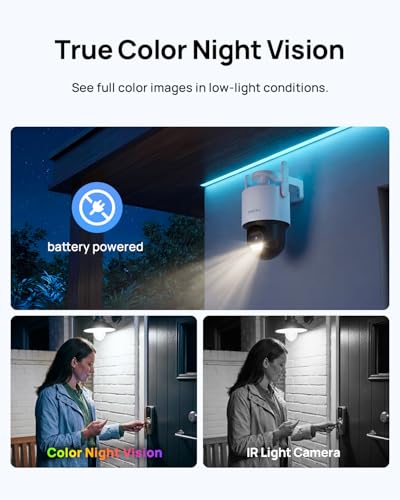
Night scenes can make or break a camera. The Anona Orbis Solar Security Camera offers color night vision when ambient light is present. In my tests, porch lights and streetlamps helped keep color. In darker spots, infrared kicks in and the view goes monochrome. The auto-switch is smooth and timely.
Color night mode helps me identify clothing colors and car shades. The camera kept enough detail to recognize a visitor at 15–20 feet. Auto-tracking still worked at night when there was enough contrast. Overall, night performance met my needs for home security and neighborhood watch duty.
Motion Detection and AI Human Recognition
AI human detection is a key feature of the Anona Orbis Solar Security Camera. I tested the system with people, pets, and passing cars. The camera flagged human motion reliably. It reduced alerts from my dog and from swaying branches.
Auto-tracking then kicked in and followed the subject. I appreciated that the camera would pan and keep a target centered. For false positives, I found the detection sensitivity menus in the app helpful. I tuned zones and sensitivity to fit my yard layout.
Solar Charging and Battery Life
Solar power is the main draw for many buyers. The Anona Orbis Solar Security Camera charges during the day and stores energy. In sunny weeks, I rarely saw low battery warnings. In cloudy stretches, the battery still lasted days. The system has built-in power saving modes that help preserve charge.
Placement matters a lot. When mounted under heavy shade, solar gain drops. I suggest a clear spot or a panel positioned for maximum sun. In winter months, expect reduced charging. I paired the camera with occasional manual charging for peace of mind during long storms.
Connectivity and Local Storage Options
The camera works on 2.4GHz Wi‑Fi only. This is common for long-range outdoor cameras. I got stable streams at 70–80 feet through light walls. For larger homes, I recommend a Wi‑Fi extender or mesh node. The camera supports microSD for local storage. I used a 128GB card and recorded weeks of motion clips locally.
Cloud storage is available but optional. I often prefer local storage to avoid monthly fees. The Anona Orbis Solar Security Camera gives flexibility. You can combine local and cloud storage for redundancy. I liked having both as options.
Audio and Two-Way Talk
The two-way audio worked well for brief exchanges. I used it to tell a delivery driver where to leave a package. The microphone picked up nearby voices clearly. The speaker was loud enough for short messages but not for long conversations.
Audio helps deter unwanted behavior. I used a short recorded message to ward off neighborhood kids trying to hide behind a shed. The speech had enough volume to be heard across my driveway without sounding tinny.
Auto-Tracking in Practice
Auto-tracking is a standout feature. When the Anona Orbis Solar Security Camera detects a person, it follows them across the scene. I watched it pivot smoothly and keep the person centered. That tracking produced useful footage for identifying intent and direction.
There are limits. Tracking can be interrupted when obstacles hide the target. I noticed a lag when the camera needed to reposition quickly. Still, in most tests, the tracking captured clear, continuous clips suitable for review and sharing.
Durability and Weather Resistance
The camera carries an IP66 rating. I left it out through sun, rain, and a windstorm. Water beads rolled off and the camera kept operating. The shell showed no rust or loose seams. I recommend a secure mount to resist heavy gusts and curious hands.
Cold months brought slower solar recovery but no hardware failures. Batteries age over time like all rechargeable cells. I expect the Anona Orbis Solar Security Camera to last several seasons with proper care and occasional firmware updates.
App Experience and Usability
I like simple apps. The app that controls the Anona Orbis Solar Security Camera is fairly straightforward. Menus show live view, motion events, and settings. I changed detection zones and motion sensitivity easily. Playback is fast and intuitive.
Occasional lag happened when streaming multiple cameras at once. The app also tries to upsell cloud packages. I bypassed that by using local storage. Overall, the app gave me the control I needed without making setup feel complicated.
Privacy and Data Security
I always weigh privacy for cameras. The Anona Orbis Solar Security Camera supports encrypted cloud transfer and local storage. I locked my app with a PIN and used strong router passwords. I also limited third‑party sharing and turned off unnecessary analytics.
For added privacy, the camera allows scheduled off times. If you want privacy during certain hours, you can disable recording. I found this useful during family gatherings or while hosting children in the yard.
Maintenance and Longevity Tips
Keep the solar panel clear. Dust and leaves cut charging in half. I check mine monthly and wipe the glass with a microfiber cloth. Firmware updates help keep the camera secure and stable. I set a reminder for updates every 1–2 months.
If your camera shows reduced runtime, test the battery health in the app. Consider switching to a new battery in year two or three for consistent performance. Secure mounts, fresh screws, and routine app checks keep the system reliable long-term.
Real-World Use Cases
The Anona Orbis Solar Security Camera works great for front porches and long drives. In one test, a camera watched a long driveway with no power outlet. The solar panel kept it running. The camera captured visitors and car movements clearly.
For rental properties, this camera offers remote monitoring without monthly fees. I set alerts for human motion and checked clips daily. It helped deter trespassing and monitor maintenance work without being invasive to renters.
Comparisons: How It Stacks Up
Compared to battery-only cameras, the Anona Orbis Solar Security Camera lowers manual charging. It trades occasional complexity in app features for the convenience of solar power. Compared to wired, high-end systems, it is cheaper and easier to install. Compared to subscription-driven cameras, it saves money if you prefer local storage.
If you want a fully integrated smart home camera that ties into advanced hubs, consider whether 2.4GHz-only connectivity fits your ecosystem. I find the trade-offs acceptable for most use cases where low maintenance matters more than full smart home integration.
Troubleshooting Common Issues
If the camera won’t connect, confirm your router supports 2.4GHz and check the password. Move closer for initial pairing. If alerts are too frequent, lower sensitivity and set activity zones in the app. For solar power problems, angle the panel toward the brightest daily sun and clean debris.
When auto-tracking fails, check for obstacles and update firmware. If the app lags, close background apps on your phone. For microphone or speaker issues, reboot the camera and check volume settings in the app.
FAQs Of Anona Orbis Solar Security Camera
Does the Anona Orbis Solar Security Camera need Wi‑Fi?
Yes. It needs a 2.4GHz Wi‑Fi network to connect and stream. The camera does not support 5GHz. A stable 2.4GHz signal is required for live view and cloud features.
How long does the solar battery last without sun?
Battery life varies. In my tests, the battery lasted several days on cloudy weather. With heavy use and long nights, expect shorter runtimes. Good sun exposure restores charge quickly.
Can the camera record without a monthly fee?
Yes. The Anona Orbis Solar Security Camera supports local microSD storage to avoid monthly costs. Cloud plans are optional for offsite backup and longer retention.
Is installation hard for one person?
No. I installed one camera solo. A drill and level are useful. Mounting takes 20–40 minutes depending on wall material. Safety matters: use a stable ladder and a helper for high or awkward spots if needed.
Will tree branches trigger false alerts?
Not often. AI human detection reduces alerts from branches. If you still get false alarms, adjust detection zones and lower motion sensitivity in the app. Proper placement away from windy foliage helps a lot.
Final Verdict: Which Should You Buy?
The Anona Orbis Solar Security Camera is my pick for homeowners who want a low-maintenance outdoor camera with solid video and solar charging. It balances clarity, coverage, and hands-off power well.
Overall, the Anona Orbis Solar Security Camera delivers strong value for homes, rentals, and off-grid spots. If you need wide coverage and minimal fees, it’s a smart buy.