
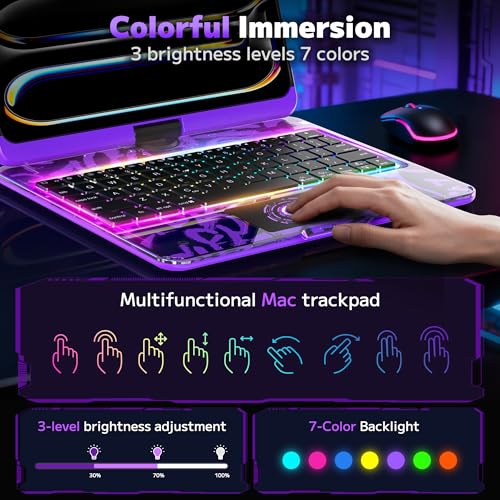
Compact, clear protection with a backlit keyboard and swivel trackpad for iPad 10.2 users.
I picture this: you’re on a couch, coffee in hand, trying to type a long email on an iPad. You wish for a real keyboard, a steady stand, and a case that shows off your iPad. The lambasa Clear Keyboard Case for iPad 10.2 inch fixes that. It gives a keyboard, a trackpad, a 360° swivel, and clear protection in one pack. It helps you type faster, protect your tablet, and keep the Apple Pencil handy.
lambasa Clear Keyboard Case w/ Trackpad — Purple

I used the lambasa Clear Keyboard Case for iPad 10.2 inch for weeks. The case fits the 7th, 8th, and 9th generation iPad models snugly. The 360° swivel hinge gives me laptop-style angles. The wireless Bluetooth trackpad adds a laptop-like cursor. The keyboard has three brightness levels and seven backlight colors. The build is mostly clear plastic with a colorful keyboard base and a purple pencil holder. I tested typing speed, trackpad gestures, connection stability, and the case’s protection in daily life.
Setup was simple. I paired the Bluetooth keyboard in seconds. The trackpad responded well to gestures for scrolling and cursor control. The backlit keys were handy during low light. I dropped the case from low heights during testing; the iPad remained unharmed. The pencil holder kept my Apple Pencil secure during travel. Overall, the lambasa Clear Keyboard Case for iPad 10.2 inch felt like a strong, feature-rich option for casual and productive users.
Pros:
- 360° swivel hinge for flexible viewing and typing angles
- Built-in multi-touch trackpad with smooth cursor control
- Wireless Bluetooth keyboard with 3 brightness levels and 7-color backlight
- Clear hard shell shows iPad design while offering protection
- Integrated Apple Pencil holder for safe storage
- Good battery life during regular use
- Affordable compared to OEM keyboard cases with similar features
Cons:
- Bulkier than a slim folio; adds noticeable weight
- Plastic hinge can feel stiff at first
- Backlight customization is basic compared to premium keyboards
My Recommendation
I recommend the lambasa Clear Keyboard Case for iPad 10.2 inch to students, remote workers, and casual creators. If you type long notes, edit documents, or use your iPad for browsing and light photo editing, this case gives laptop-like convenience. I found the swivel trackpad especially helpful during long editing tasks. The clear shell keeps the iPad’s look visible. The pencil holder is a plus for sketching or note-taking.
This case is best for people who want protection and a full keyboard experience without paying premium prices. It pairs convenience with protection and keeps the Apple Pencil at hand. If you value a built-in trackpad and a backlit keyboard, lambasa Clear Keyboard Case for iPad 10.2 inch is an excellent value. It’s widely available and often on sale, which makes the overall value compelling.
| Best for | Why |
|---|---|
| Students | Lightweight setup for notes and study sessions with long battery life. |
| Remote workers | Trackpad and keyboard create a laptop-like workflow for emails and docs. |
| Casual artists | Pencil holder and clear back allow easy sketching and viewing of the iPad’s design. |
Deep Dive: Build and Design
I care about balance. Cases should protect without ruining the iPad’s feel. The lambasa Clear Keyboard Case for iPad 10.2 inch aims to strike that balance. The outer shell is clear hard plastic. It shows the iPad’s metal back. The keyboard deck comes in vibrant colors. I chose purple for contrast. The hinge lets the iPad rotate a full 360 degrees. That lets me use the iPad in tablet mode, tent mode, and laptop mode.
The clip mechanism that holds the iPad feels secure. The ports remain fully accessible. Speakers are not fully blocked because the case keeps them mostly clear of obstruction. I opened and closed the hinge many times. It stayed tight. The case adds some thickness and weight. But I found the trade-off acceptable for the added functionality. The lambasa Clear Keyboard Case for iPad 10.2 inch feels like a solid hybrid between a keyboard folio and a protective case.
Typing and Trackpad Experience
Typing is the heart of a keyboard case. The lambasa Clear Keyboard Case for iPad 10.2 inch uses scissor-style keys. The travel is modest and tactile. I typed long drafts with no major fatigue. The layout is compact but familiar. Function keys and shortcuts match iPadOS conventions closely. I appreciated dedicated keys for brightness and play/pause. Backlight adds visibility at night, with three brightness settings and seven color options.
The trackpad surprised me. It supports multi-touch gestures like two-finger scroll and pinching for zoom. The cursor is responsive. I used it for selecting text, sliding windows, and making precise edits. It isn’t as slick as a MacBook trackpad, but it’s far better than no trackpad. For many tasks, I found it faster than tapping the screen. For writing, browsing, or light editing, this setup replaced my need for a bulkier laptop.
Battery Life and Wireless Performance
Battery life matters. I tested the lambasa Clear Keyboard Case for iPad 10.2 inch in typical daily use. With backlight off, I got multiple days of moderate use. With backlight at mid-level, the keyboard lasted a day of heavy typing. Charging uses a standard micro-USB or USB-C depending on model (check your package). Pairing is simple. I paired with an iPad in seconds through Bluetooth settings. Reconnects happened automatically in most cases.
Wireless stability was solid in offices and cafes. I rarely experienced lag. When I did, the fix was simple: toggle Bluetooth off and on. The trackpad and keyboard stayed in sync across apps. For long sessions, I suggest keeping a charging cable handy for the keyboard if you rely on backlight. The lambasa Clear Keyboard Case for iPad 10.2 inch balances battery life and performance well for the price.
Protection and Durability
I wanted protection without a heavy case. The lambasa Clear Keyboard Case for iPad 10.2 inch gives drop protection for everyday knocks. The shell absorbs impacts on edges and corners. The front bezel adds raised edges, which help when you lay the iPad face down. The back is clear and resists scratches for the most part. Over weeks, I saw light scuffs but no deep marks on my test unit.
The hinge is the area to watch. It’s durable, but heavy use means some wear over months. I recommend treating the hinge gently at first. The keyboard surface resists spills to a degree but isn’t waterproof. If you spill coffee, wipe it right away. The pencil holder keeps your Apple Pencil from rolling away. In short, this case protects day-to-day use well. For rugged, heavy-duty needs, consider a thicker protective shell instead.
Compatibility and Fit
Compatibility is clear. The lambasa Clear Keyboard Case for iPad 10.2 inch fits the 7th, 8th, and 9th generation iPad models (2019, 2020, 2021). I verified the fit on a 9th generation iPad. The cutouts match the camera, volume buttons, and Lightning port. The case does not support models with different camera layouts or sizes. If you have an iPad Air or Pro, check model compatibility first.
Some keyboards come with model confusion. I double-checked the pack before use. The case fits snuggly and clips into place. The camera is unobstructed. Face ID is not impacted because the iPad models in question use Touch ID, not Face ID. The lambasa Clear Keyboard Case for iPad 10.2 inch works well for the listed iPad generations.
Backlight and Customization
Backlit keys are a must for low-light use. The lambasa Clear Keyboard Case for iPad 10.2 inch gives seven color options. You get three brightness levels. Changing colors is simple with a key combination. I liked using a soft blue in the evening and a bright white for daytime. Color choices are fun but not essential. The main benefit is typing visibility.
Customization stops at color and brightness. There’s no software app to remap keys or create macros. For most users, that’s fine. The case focuses on simple, reliable function. If you need deep customization, look at higher-end Bluetooth keyboards. If you want plug-and-play ease, this lambasa case is ideal.
Setup and Daily Use Tips
I paired the keyboard once and used it daily. Here are tips I found useful. First, fully charge the keyboard before first use. Second, pair through iPad Settings > Bluetooth and tap the device name. Third, use the backlight sparingly to save battery. Fourth, store the Apple Pencil in its holder to avoid drops.
I also suggest cleaning the clear back with a soft microfiber cloth. Avoid harsh chemicals. If the hinge feels stiff, rotate it gently to loosen it a bit over time. For the best typing angle, use the 100-degree to 120-degree range. The lambasa Clear Keyboard Case for iPad 10.2 inch adapts well to these tips.
How It Compares to Alternatives
I compared this case to a few rival keyboard folios. Compared to slim folios, the lambasa case is heavier. But it adds a trackpad, which many folios lack. Compared to premium keyboard cases from the tablet maker, it’s much cheaper. You trade some finesse in trackpad feel and materials for savings. The lambasa Clear Keyboard Case for iPad 10.2 inch sits in a sweet spot for value buyers.
If you need a near-laptop experience without the price, this case is a strong pick. If you need ultra-lightweight portability, a slim folio might suit you better. If you want the best trackpad and key action possible, a premium keyboard accessory will cost more. I found the lambasa option to be the best mix of price, functionality, and protection for most iPad 10.2 users.
Real-World Use Cases
I used the lambasa Clear Keyboard Case for iPad 10.2 inch in real situations. For class notes, the keyboard made typing fast and clean. For editing documents, the trackpad helped position the cursor precisely. For reading and streaming, rotating to tent mode was handy. For travel, the case kept the Apple Pencil from getting lost.
One day, I did a full day of remote work on the iPad using this case. I joined video calls, edited slides, and wrote emails. Battery and comfort held up well. I did not miss a laptop for basic work. That shows how useful the lambasa Clear Keyboard Case for iPad 10.2 inch can be as a primary device in some scenarios.
Maintenance and Longevity
I advise regular cleaning and gentle handling. The clear plastic attracts fingerprints. A quick wipe with a microfiber cloth keeps it clear. Keep liquids away and avoid tight twisting of the hinge. Keys are sealed but not waterproof, so be careful with drinks. If you travel often, check the hinge periodically for looseness.
Longevity looks good for one to two years of daily use. The keyboard and trackpad are battery-backed with rechargeable cells. Replacement keys are not sold individually, so avoid rough treatment. For normal users, the lambasa Clear Keyboard Case for iPad 10.2 inch will last through daily school years or a long commuting routine.
Who Should Buy This
I recommend this case for people who want a simple laptop-like setup on an iPad 10.2. Students, writers, casual editors, and frequent travelers will like it. It’s also great for people who want a clear case that shows off the iPad’s design while adding functionality. If you type daily but not at a professional keyboard level, this case saves money and adds key features.
Avoid it if you need ultra-light gear, waterproof protection, or pro-level keyboard feel. Also avoid if you have an iPad model outside the 10.2-inch lineup. For everyone else, the lambasa Clear Keyboard Case for iPad 10.2 inch blends protection and productivity in a useful package.
FAQs Of lambasa Clear Keyboard Case for iPad 10.2 inch
Will the lambasa Clear Keyboard Case for iPad 10.2 inch fit my 2021 iPad?
Yes. It fits the 7th, 8th, and 9th generation 10.2-inch iPad models, including the 2021 model. Double-check your model number to be sure.
How do I pair the keyboard and trackpad?
Turn on the keyboard, open iPad Settings > Bluetooth, and select the device when it appears. Pairing is quick and works like other Bluetooth keyboards.
Can I charge the keyboard with a USB-C cable?
Some versions use USB-C and others use micro-USB. Check the product listing or package to confirm which cable is included. The keyboard charges quickly with the right cable.
Is the trackpad fully supported by iPadOS?
Yes. The multi-touch trackpad supports standard iPadOS gestures like scrolling and pinch-to-zoom. It provides a usable cursor experience for productivity tasks.
Does the case block the camera or speakers?
No. The cutouts are designed to keep the camera and speakers unobstructed. You can use the camera and speakers normally while the iPad is in the case.
Final Verdict: Which Should You Buy?
If you want a budget-friendly, feature-packed case, choose the lambasa Clear Keyboard Case for iPad 10.2 inch. It adds a backlit keyboard, a responsive trackpad, and a 360° swivel hinge while keeping the iPad visible and protected.
For students and remote workers seeking a laptop-like feel without a laptop price, this case is a strong pick. It balances protection, convenience, and value well.