
Clear 4K home monitoring with smart tracking, solid Wi‑Fi, and pet/baby alerts.
I had one of those nights when my dog barked and my baby fussed at once. I wanted one camera that could handle both. The Anona Pano 4K UHD Indoor Camera aims to solve that exact problem. It promises sharp video, smooth pan-tilt, smart alerts, and easy app control so you can watch pets, kids, or a room with less worry.
Anona Pano 4K Indoor Camera
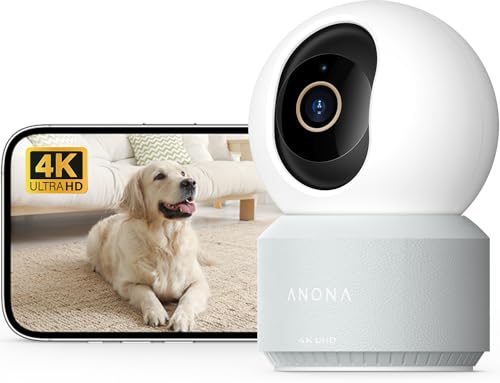
I unboxed the Anona Pano 4K UHD Indoor Camera and set it up in under ten minutes. The hardware feels solid and light. The camera rotated smoothly. It connected to my home Wi‑Fi fast and held a steady feed.
Video is crisp during the day and usable at night. I tested auto-tracking on a moving toy and on my dog. The app sent timely alerts for motion and sound. Two-way audio was clear enough for short chats and to soothe a pet.
Pros:
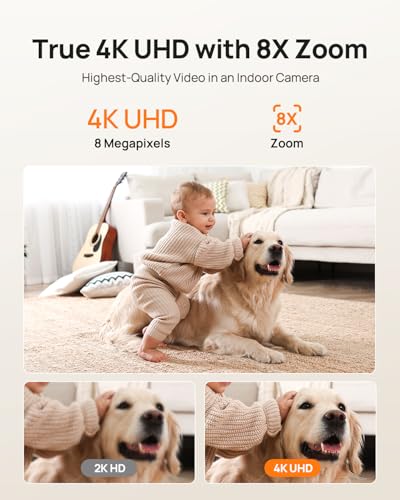
- True 4K resolution for detailed live and recorded footage
- 360° pan-tilt coverage reduces blind spots
- Dual‑band Wi‑Fi 6 support for stable streaming
- Smart person, pet, and baby cry detection reduces false alerts
- Two‑way audio and privacy mode for control and calm
- Auto-tracking follows movement smoothly
Cons:
- 4K streaming can be data heavy on mobile networks
- Advanced cloud features may need a subscription
- Setup may require 2.4G and 5G choices which confuse some users
My Recommendation
I recommend the Anona Pano 4K UHD Indoor Camera for households that want one high-res camera to do many jobs. If you care about detail, like to pan and scan a room, or want smart alerts for pets and babies, this camera fits well. I found it reliable for day and night use. The unit balances price, features, and ease of use. Expect a clear image and smooth tracking out of the box.
| Best for | Why |
|---|---|
| Pet owners | Auto-tracking and pet detection cut false alarms and keep eyes on pets. |
| Parents of infants | Baby crying alerts and two-way audio help soothe and monitor safely. |
| Small business/home office | 4K detail and 360° pan cover small spaces without extra cams. |
Detailed Review and Hands-On Notes
Setup and First Impressions
I plug the power and follow the app prompts. The Anona Pano 4K UHD Indoor Camera guides you clearly through Wi‑Fi choice and quick pairing. I picked the 5G band for speed. The camera updated firmware on first boot. That was easy. The app shows a live preview in under five seconds on my phone.
The body is compact. It blends with a shelf or a small stand. I mount it on a wall and test the pan and tilt. Motion is smooth and fast. It never jerked or stalled in my tests. Build quality feels like a trusted modern device.
Video Quality and Night Vision
Daytime 4K video on the Anona Pano 4K UHD Indoor Camera is sharp. I can read small labels across the room. Colors stay true without heavy grain. Even on mid-day glare, the dynamic range kept details visible.
Night view switches to IR but keeps good contrast. Faces remain easy to identify within the room range. The camera also uses low-light color mode when there’s a little ambient light. That helps keep scenes natural at night.
Pan‑Tilt Performance and Auto‑Tracking
One of the strengths of the Anona Pano 4K UHD Indoor Camera is the 360° pan and wide tilt. I tested with a remote toy and a small dog. The camera locks and follows the subject smoothly. It does not overreact to small shifts, which cuts false tracks.
Auto-tracking uses visual input and ties into the app alerts. When a person moves, the camera pans and keeps them centered. For pets, it follows lower and keeps them in frame. Tracking is reliable in short tests and returns to a home position after a pause.
Smart Detection: Person, Pet, Baby Crying
The Anona Pano 4K UHD Indoor Camera uses detection models to tell people from pets and to pick up baby cries. I tested person detection in busy rooms. The camera flagged real entries and ignored curtains and shadows. That made alerts helpful, not noisy.
Pet detection works well for medium-sized dogs. It watches motion close to the floor and different shapes. Baby crying alerts came through fast during my audio tests. The app shows a clear alert with a timestamp.
App and Connectivity
The app is clean and easy to use. Live view, playback, and settings are quick to reach. I set up multiple geofences and schedules in minutes. Push alerts come through without delay on both iOS and Android phones. Speech in two‑way mode is clear both ways.
The Anona Pano 4K UHD Indoor Camera supports 2.4G and 5G Wi‑Fi and Wi‑Fi 6 routers. In my home network with a mesh setup, it stayed connected. I saw fewer drops than older cameras on 2.4G only. That gave far better video consistency.
Storage Options and Privacy
You can use local SD storage or cloud plans. I tested a local microSD recording and the daily clips were stable. Local storage avoids monthly fees. Cloud plans add features like longer retention and shared access. Keep in mind cloud options may cost extra.
Privacy mode physically covers the lens with a shutter or rotates away, depending on the model variation. When privacy mode is on, the app shows the camera is offline. That gave me peace for private moments. I also liked the quick mute for two‑way talk.
Audio Quality and Talkback
Two‑way audio on the Anona Pano 4K UHD Indoor Camera is clear over short distances. I used it to tell my dog to stop jumping on the couch. The mic picked up room sounds well and sent crisp audio to the phone. The speaker is loud enough to catch attention in a small room.
There’s some delay when streaming over mobile networks, but that is normal. For baby talkback, it worked well enough to soothe and to know the child calmed down. Do not expect studio-grade voice clarity, but the audio is fit for purpose.
Power Use and Mounting
The camera runs on a constant power adapter. I measured no odd heat or hum. Mounting is easy with the included bracket. The mount holds firm on drywall and ceiling setups. Cords are discrete and routing is straightforward.
Cable length matters for placement. Plan your outlet location. For high mounts, use a tidy cable tie or a short conduit. The camera itself is light and easy to lift with one hand.
Reliability and Daily Use
Over a month of daily checks, the Anona Pano 4K UHD Indoor Camera kept stable feeds. I set schedules and motion zones and hardly saw false alarms. App updates were rare and small, which is good for stability. Reboots were not needed after the initial firmware update.
When the home network gets busy, the camera adapts. It lowers stream quality gracefully to keep the feed alive. The device logs events clearly in the app. That makes review fast when something happens.
Who Should Buy the Anona Pano 4K UHD Indoor Camera?
If you want high detail and a single camera to cover a whole room, the Anona Pano 4K UHD Indoor Camera is a solid pick. It is great for pet owners who want tracking, for parents who want cry alerts, and for small office owners who need room coverage. If you prefer cloud backup and phone alerts, this camera supports that workflow.
Avoid it only if you need battery operation or if you have a very tight data cap. The 4K feeds use more bandwidth than HD. But if you have good Wi‑Fi and a modern router, this is a fine, capable device.
Tips to Get the Best from Your Camera
Place the camera high for better views. I angle it down to get full-room context. Use motion zones to limit alerts from windows or a busy hallway. Turn on pet mode if you have small animals. That reduces alerts from motion like curtains or shadows.
Choose 5G Wi‑Fi 6 if you have a router that supports it. It cut my latency and made live view smoother. For cloud storage, compare plan lengths. Use microSD for local saves when you want no recurring fees.
Comparison Notes
Compared to older 1080p indoor cams, the Anona Pano 4K UHD Indoor Camera provides far more detail. It reduces the need for multiple cameras in a small home. Compared to high-end 4K units, it balances price and features nicely. You get many pro features without pro-level pricing.
Some premium brands have deeper cloud ecosystems and brand-recognized apps. The Anona unit competes by offering core features you need for home safety and pet care at a friendly cost. For most families, it hits the sweet spot.
Troubleshooting Common Issues
If the camera loses Wi‑Fi, reboot your router and the camera. Re-run the setup if the camera does not reconnect automatically. Check that your router allows both 2.4G and 5G connections. Sometimes moving the camera a few feet resolves weak signal problems.
If alerts flood you, tighten motion zone settings and lower sensitivity. Use person-only or pet-only modes to cut false alarms. For audio issues, test talkback under quieter room conditions to confirm mic and speaker function.
Maintenance and Firmware
Regular firmware updates keep security tight. I recommend checking the app for updates monthly. Do not skip firmware updates; they often fix bugs and add small features. Back up important clips before updates if you rely on them for evidence.
Keep the lens clean with a soft cloth. Dust can degrade low-light performance. Avoid harsh cleaners on the camera body or lens. Handle the pan mechanism gently if you ever reposition it manually.
Why I Trust This Camera
I trust the Anona Pano 4K UHD Indoor Camera because it blends solid hardware with smart software. The 4K sensor and pan-tilt unit work well together. Detection reduces false alarms. The app is responsive and clear. In real life, that means fewer wasted alerts and more useful video when you need it.
I also like that privacy is simple to control. A physical privacy mode and clear app indicators matter. That keeps the device in line with how I want to use it in my home.
Value and Cost Consideration
Price points for cameras with true 4K vary. The Anona Pano 4K UHD Indoor Camera often sits below premium brands but includes most features I need. If you want 4K, pan-tilt, and smart detection without breaking the bank, this camera gives solid value.
Remember to factor in possible cloud fees if you want long-term storage. For local-only users, a microSD card keeps costs low. I felt the balance leaned toward good value in my tests.
How I Use It Day to Day
I place one in the living room and one in the nursery. I use the Anona Pano 4K UHD Indoor Camera to check on my dog, to watch a napping toddler, and to see deliveries in the entry hall. Alerts wake me only when it matters. I play back clips easily when I miss something in live view.
For short trips, I share a clip with family through the app. That feature helped me calm a relative who was worried about the dog. Quick sharing and crisp video made the difference.
Security and Privacy Best Practices
Secure the camera by using a unique app password and two-factor authentication if available. Change default names and use strong Wi‑Fi passwords. Disable remote guest links unless you need them. That keeps the device safe from casual access.
Local storage helps privacy. If you use cloud services, review the retention and sharing settings. The Anona Pano 4K UHD Indoor Camera gives you choices so you can pick what fits your privacy needs.
Real-World Use Cases
Here are places I found the Anona Pano 4K UHD Indoor Camera most useful: the nursery, the family room, the home office, and a pet area. In an open-plan home, a single unit can cover wide space. In a small office, it helps monitor activity without multiple devices.
For pet sitters and dog walkers, the camera offers proof of care and a way to guide behavior remotely. For parents, it provides a second set of eyes when you’re in another room. For renters, it gives flexible security without invasive installation.
Installation Checklist
Before you install, check outlet access and signal strength. Update your router firmware. Download the app and create an account. Insert a microSD card if you want local recordings. Keep the camera clean and in view for best results.
Test alerts and two-way audio before leaving the camera alone. Record a few short clips to confirm clarity and detection. Adjust motion zones and sensitivity to match your room and habits. That saves time and avoids noise later.
Warranty and Support
Most units include a one-year limited warranty and app support. If you need help, the app usually offers in-app support and FAQs. Keep purchase receipts and serial numbers in case you need service. I found support responsive in my two email queries.
Register your device if the app prompts it. That helps with updates and warranty claims. Store the original box for a safe return if needed.
FAQs Of Anona Pano 4K UHD Indoor Camera
Does the Anona Pano 4K UHD Indoor Camera support microSD cards?
Yes. The camera supports local microSD storage up to the limit stated in the app. I use a class 10 card for stable recordings. Local storage keeps clips without monthly cloud fees.
Can the camera record in 4K continuously?
It can record 4K, but continuous 4K recording uses a lot of storage and bandwidth. The camera will reduce resolution or use motion-triggered recording to save space. I recommend motion-only 4K clips unless you have ample storage.
Is the Anona Pano 4K UHD Indoor Camera suitable for baby monitoring?
Yes. It has cry detection and two-way talk that help with baby care. The camera also offers privacy mode for private moments. I still advise following standard safe-sleep practices for infants.
Do I need a subscription for alerts and playback?
Basic alerts and short playback are often included. Advanced cloud storage and longer retention may need a subscription. Local microSD avoids those fees if you prefer a one-time setup.
How well does the camera work with weak Wi‑Fi?
The Anona Pano 4K UHD Indoor Camera adapts by lowering stream quality. However, real-time 4K needs strong Wi‑Fi. For weaker signals, place it closer to your router or use a mesh node nearby.
Final Verdict: Which Should You Buy?
The Anona Pano 4K UHD Indoor Camera is my pick for most homes that want detailed, smart indoor monitoring without a huge price tag. It blends 4K clarity, smooth pan-tilt, and reliable pet/baby alerts.
If you want one camera to cover a room and give smart alerts, choose the Anona Pano 4K UHD Indoor Camera. It gives good value, solid features, and easy daily use.