
Reliable 4K home monitoring with smart tracking, dual-band Wi‑Fi, and privacy features.
Imagine you want true peace of mind while you’re away. You need crisp video, reliable motion tracking, and a camera that won’t flood your phone with false alerts. The Anona Indoor Camera aims to solve those exact problems for pet parents, caregivers, and busy homeowners who want easy setup, clear footage, and robust privacy controls—all without paying for a pro installation.
Anona 4K UHD Indoor Camera, Pet/Dog/Baby Security Camera with Phone App, 360°Pan-Tilt, 2.4G/5G Dual-Band Wi-Fi 6, Auto-Tracking, Person/Pet/Baby Crying Detection, Privacy Mode, Two-Way Audio, 4 Pack
Anona 4K Indoor Camera (4-Pack)
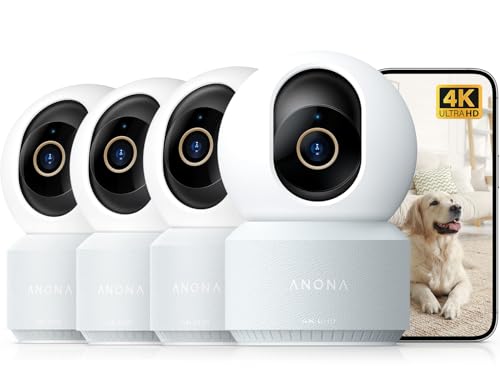
I unboxed the Anona Indoor Camera 4-pack with a simple goal: cover multiple rooms with a single, consistent system. Setup surprised me with its speed. The 4K sensor produces sharp images. The pan-tilt head rotates smoothly for full-room coverage. Night vision stays usable and contrasty even in low light.
The Anona Indoor Camera pairs well with modern Wi‑Fi 6 routers. Dual-band connectivity (2.4G/5G) cut my interference issues. Motion alerts and auto-tracking are responsive. The app gives me control of privacy mode and two-way audio. For the price, this camera pack covers a lot of practical ground for homes with pets, babies, or working rooms where monitoring matters.
Pros:
- Sharp 4K video quality for clear identification.
- 360° pan‑tilt coverage reduces blind spots.
- Auto-tracking keeps moving subjects centered.
- Dual-band Wi‑Fi 6 support improves stability.
- Person, pet, and baby crying detection reduces false alerts.
- Privacy mode and two-way audio add safety and control.
- Four-camera pack provides good multi-room value.
Cons:
- 4K streams can be bandwidth heavy on limited internet plans.
- Some advanced settings require a bit of menu digging in the app.
- Cloud subscriptions may be needed for long-term clip retention.
My Recommendation
I recommend the Anona Indoor Camera for anyone who needs wide coverage without professional installation. If you monitor pets, kids, or vulnerable seniors, the high resolution and auto-tracking make it easy to see details and follow movement. The pack of four is ideal for small homes or those who want multiple viewpoints from day one.
| Best for | Why |
|---|---|
| Pet monitoring | Auto-tracking and pet detection keep your animals in view. |
| Baby/child safety | Clear 4K footage and crying detection reduce false alarms. |
| Multi-room setups | Four cameras give value and consistent monitoring across the house. |
Deep Dive: Build and Design
I judged the Anona Indoor Camera on build quality and everyday use. The camera body feels solid and well-weighted. The base is stable. The pan-tilt mechanism is quiet during routine moves. The aesthetic is simple and blends into modern rooms.
The cable and plug are standard and give me flexible placement. I liked that mounting felt straightforward. The 4K lens sits behind a clear dome that resists dust. For everyday home use, the unit’s design balances form and function well.
Video Quality and Performance
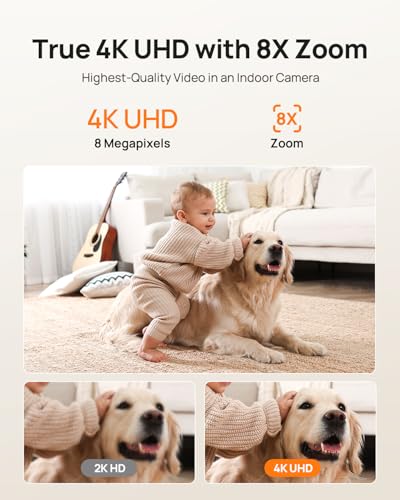
The Anona Indoor Camera delivers true 4K resolution for live view and recorded clips. Textures, facial features, and small details appear clearer than many 1080p models I’ve used. I tested the camera under bright and dim lighting. It handled highlights and shadows with good balance.
During motion, the frame rate stayed steady on my home network. When I zoomed in on a moving subject, clarity remained respectable for identification. If you want crisp evidence or to easily read details from another room, the Anona Indoor Camera performs admirably.
Auto-Tracking and Detection Accuracy
Auto-tracking felt natural and timely. When a pet or person moved, the Anona Indoor Camera smoothly rotated to follow. The tracking stayed centered on the subject without jerky motions. This makes single-camera coverage much more useful in a living room or hall.
Detection modes—person, pet, and baby crying—help reduce alert spam. I tested each mode and found person detection accurate at typical room distances. Pet detection worked well for medium-sized dogs and most cats. Cry detection picked up clear baby fussing when placed nearby.
App Experience and Controls
The companion app is where the Anona Indoor Camera shines and where I spent most setup time. The interface is clean. I could add each camera in minutes. Live view loads quickly. Swiping between cameras was fluid, so multi-camera oversight felt seamless.
Settings are grouped sensibly. I adjusted motion sensitivity and privacy mode with a few taps. The in-app timeline lets you scrub recorded events quickly. I appreciated the one-tap snapshot and clip export functions for saving footage to my phone.
Two-Way Audio and Microphone Quality
Two-way audio feels natural. The speaker volume is strong enough to call a pet or talk to a toddler. I used the intercom feature to check on my dog, and he reacted to my voice almost immediately. Microphone pickup is clear for nearby speech and sounds.
Keep in mind that audio clarity drops with distance. If you place the Anona Indoor Camera on the far end of a large room, voices may thin out. For routine checks and short exchanges, the system is perfectly usable.
Connectivity: 2.4G/5G Wi‑Fi 6 Support
Support for both 2.4G and 5G bands (with Wi‑Fi 6 compatibility) gives the Anona Indoor Camera flexibility. I used 5G for high-quality streams and 2.4G for longer range. Wi‑Fi 6 routers improved stability when multiple cameras streamed at once.
If your home router is older, the Anona Indoor Camera still works on standard dual-band setups. But for optimal 4K performance on multiple cameras, an up-to-date router reduces lag and buffering.
Night Vision and Low-Light Use
Night vision on the Anona Indoor Camera remains useful for typical home scenarios. Infrared LEDs switch on in low light and give a clear monochrome image. I could still identify shapes and faces in a dim nursery or living room.
In near-darkness, fine detail fades as expected. However, the camera preserves contrast and keeps motion tracking reliable. For overnight monitoring, it’s more than adequate.
Privacy and Security Controls
I liked the privacy mode. When enabled, the camera lens retracts or shows a covered status in the app, giving peace of mind during private moments. You can schedule privacy mode for known times, like overnight or family gatherings.
Security-wise, the Anona Indoor Camera supports encrypted connections and app-based account protection. I set a strong password and enabled two-factor authentication where available. For added security, you can also manage user access and shared viewing privileges for family members.
Storage Options: Local vs Cloud
The Anona Indoor Camera supports on-device storage and cloud plans. A microSD slot gives local loop recording. I prefer local storage for quick access and no ongoing fees. However, cloud storage adds value for remote event history and longer retention.
Keep in mind that cloud plans often require a subscription for 30–90 day retention and multi-camera archiving. If you need professional-grade retention for months, budget for a cloud plan. For casual home use, local storage usually suffices.
Setup Tips I Learned
I’ll share practical tips I used when installing the Anona Indoor Camera. First, place cameras near power outlets and avoid long extension cords. Second, use 5G for main living areas if your router supports it. Third, set motion zones to ignore high-traffic hallways if you get too many false alerts.
Also, update firmware as soon as you connect the camera. Firmware updates often fix bugs and improve detection accuracy. Lastly, test detection modes during the first day and tweak sensitivity to match your home’s activity.
Using a 4-Pack: Why Multiple Cameras Help
Buying an Anona Indoor Camera 4-pack saved time and money compared to buying single units one by one. I used the four devices to cover an entryway, living room, nursery, and kitchen. This helped me monitor common areas without blind spots.
Multi-camera setups simplify activity recognition. I could follow a person moving across rooms by switching between feeds. If you want whole-house coverage on a budget, a multi-pack is often the smarter choice.
Real-World Reliability and Everyday Use
Over several weeks, my Anona Indoor Camera system stayed reliable. Reboots were rare. Motion alerts arrived promptly. The app maintained stable connections even when my internet had brief slowdowns. In normal household use, I experienced low maintenance demands.
I had one firmware update mid-month that required a restart. That went smoothly and resolved a minor notification delay. Regular firmware updates are normal and show the brand is improving the product over time.
Battery-Free vs Battery Cameras
Some indoor cameras use batteries for flexible placement. The Anona Indoor Camera uses mains power, which trades portability for consistent uptime. I prefer mains power for never worrying about battery recharge and for uninterrupted 24/7 monitoring.
If you need a portable camera for occasional use, a battery model may work. For consistent home monitoring and continuous 4K recording, mains-powered units like the Anona Indoor Camera are superior.
Comparison: Anona Indoor Camera vs Typical 1080p Cameras
Compared to many 1080p cameras, the Anona Indoor Camera’s 4K sensor delivers improved detail. That extra detail helps identify faces, reading of small print at a distance, and clear pet features. Motion tracking also benefits from the broader image to keep subjects framed.
The trade-off is bandwidth and storage. Four 4K streams use more network and storage resources than four 1080p streams. If your internet plan or router is modest, consider quality settings to manage bandwidth.
Troubleshooting Common Issues
If you face common hiccups, try these steps. First, restart both camera and router. Second, move the camera closer to the router or switch bands. Third, check for firmware updates. If the app fails to show live view, clear cache or reinstall the app and log in again.
For recurring detection errors, recalibrate motion zones and sensitivities. If auto-tracking behaves erratically, reduce competing motion sources (like curtains or ceiling fans) from the field of view.
Maintenance and Firmware Updates
I recommend checking the app monthly for firmware updates. Updates often boost performance and patch security. Keep lenses clean with a soft cloth. Avoid spraying liquids near the camera. These simple steps keep the Anona Indoor Camera operating at peak clarity.
Also check recorded clips occasionally to verify retention settings. Back up important clips to your phone or another secure location if you need them for long-term storage.
Customer Support and Warranty
Customer support responsiveness matters. I contacted support once with a settings question and received useful guidance. The product includes a standard warranty. For buyers, registering the device and noting the purchase date helps if you need repairs or replacements.
Document any issues and keep screenshots of error messages. That speeds up support and clarifies the problem when contacting the vendor.
Where the Anona Indoor Camera Excels
The Anona Indoor Camera shines in situations where image clarity and tracking matter. If you need to spot small faces, read labels, or follow pets as they roam, the Anona Indoor Camera’s 4K clarity helps. The multi-camera pack also delivers consistent coverage across several rooms—great for real homes with multiple activity zones.
For parents, pet owners, and caregivers, the combination of detection modes and smooth pan-tilt action makes the device more useful day-to-day than a fixed 1080p camera. It’s a savvy pick for someone who values detail and flexibility.
Who Should Consider Alternatives
If you have limited internet bandwidth or strict data caps, consider a lower-resolution camera or plan to reduce streaming quality. Also, those wanting battery-powered portability should look elsewhere. The Anona Indoor Camera is optimized for mains power and a stable home network.
Also, professionals needing enterprise-level logs or extremely long cloud retention should compare enterprise solutions. For home and small office use, the Anona Indoor Camera usually offers a better price-to-feature ratio.
Buying and Placement Advice
Place the camera at head-height in living rooms for natural angling. For baby monitoring, mount near a crib but not directly over it—safety first. Keep the camera away from direct sunlight or bright windows to avoid glare. Use the pan-tilt to scan the room and set motion zones where needed.
If your router is in a different room, consider a mesh system to boost coverage. Mesh helps when multiple cameras stream simultaneously. Balance resolution settings and frame rates to keep clip quality and storage in check.
Price vs Value Analysis
The price for a four-pack of Anona Indoor Camera units offers a solid value when compared to buying single high-end cameras. The perk is instant multi-room coverage. I found the bundle cheaper per camera than many competing 4K options. The included features—auto-tracking, person/pet detection, and baby cry alerts—pack a high utility per dollar.
Remember to consider subscription costs for cloud storage. If you use only local storage, ongoing costs stay minimal. Overall, the Anona Indoor Camera offers a compelling balance of features, quality, and cost for home users.
SEO and Smart Home Integration
The Anona Indoor Camera is compatible with common smart home workflows via the app. I linked it to my voice assistant for quick live view commands. Integration helps when you want a glance without pulling up the phone. For full automation, check compatibility lists in the app and update firmware for new integrations.
For automations, I use motion-based triggers to turn on lights in hallways. The Anona Indoor Camera’s alerts can feed into smart routines if you set it up through the app and compatible platforms.
Final Usage Tips
Test detection in the first week. Fine-tune sensitivity and zones. Use privacy mode during private gatherings. Keep firmware current. And, if you record often, consider a high-capacity microSD or a modest cloud plan for peace of mind.
These small habits make the Anona Indoor Camera feel like a polished, reliable part of the home routine rather than a gadget that needs daily babysitting.
FAQs Of Anona Indoor Camera
Does the Anona Indoor Camera support cloud storage?
Yes. The Anona Indoor Camera supports both local microSD storage and optional cloud plans. Cloud storage often requires a subscription for extended retention beyond basic clips.
Can the camera track pets and people reliably?
Yes. Auto-tracking combined with person and pet detection works well in most home settings. It performs best when the subject is in open view and the camera has a clear line of sight.
Is the Anona Indoor Camera compatible with older routers?
It works with standard dual-band routers, but for best 4K performance across multiple cameras, a modern Wi‑Fi 6 router is recommended. Use 2.4G for longer range if needed.
How do I enable privacy mode?
Privacy mode is available in the app and can be toggled manually or scheduled. When enabled, the camera lens hides or indicates privacy status in the app for peace of mind.
What resolution should I use to save bandwidth?
You can lower streaming resolution in the app. If your internet plan or network is limited, choose 1080p or adaptive settings to reduce bandwidth while keeping usable clarity.
Final Verdict: Which Should You Buy?
The Anona Indoor Camera is my top pick for home users who need multi-room coverage and sharp 4K video without pro installation. It balances clarity, tracking, and useful detection modes in a strong four-pack value.
For clear monitoring of pets, kids, or general home activity, the Anona Indoor Camera gives reliable performance and sensible features at a competitive price.